


 Previous
You can connect your smart device to a projector by scanning the connecting code on the projector and project files from your smart device.
First, you need to create a connecting code with the registered projector information. For details about creating a connecting code, see Creating connecting codes for a projector.
 Open a file to project.
 Tap the linkage icon (
 ) or [Project].
 Tap [Specify Projector by Connecting Code].
When using an Android smart device, tap [Specify Projector by Connecting Code], and then tap [Next].
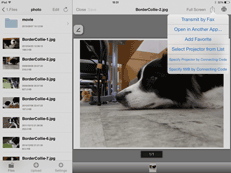
The connecting code reader starts.
 Scan the connecting code on the projector using your smart device.
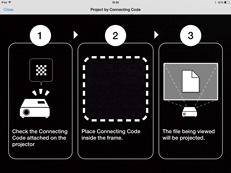
Place the connecting code inside the frame according to the onscreen instructions.
The smart device accesses the projector, and then it sends the converted files to be projected via DocsConnect.
The projector starts projecting the received files.


