


 Previous
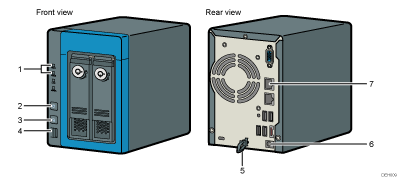
HDD1/HDD2 lamp
Indicates the machine's status. For details, see Notification by Lights and Beeps.
[Main Power] key/Status lamp
Turns on the main power.
Status lamp indicates the machine's status. For details, see Notification by Lights and Beeps.
[Func.] button/Function lamp
If an error occurs and beeping continues, press the button to stop the beeping temporarily.
Function lamp indicates the machine's status.
USB port 1
Connects an external storage device for data backup.
Clip to prevent the power cord from being unplugged
Prevents the power cord from being disconnected. Use this clip when you plug in the power cord.
DC-IN
Connects the AC adapter.
LAN port
Connects a LAN cable.

Do not connect USB devices to USB ports on the back side of the machine.
Do not use ports and connectors that are not explained in this manual. These ports and connectors are used by service representatives when they set up and check the machine.


