Use this tab to configure further advanced options for printing.
Available functions differ depending on the printer or printer driver you are using.
Manage One Click Presets
Manage...
Opens the Manage One Click Preset List dialog box to specify a one click preset name and comment, or change the display order. You can also share registered one click presets among users and delete existing one click presets.
Do not Allow User to Register Preset
Prohibits users from registering one click presets.
When users open Frequently Used Settings Tab or Detailed Settings Tab, Register Current Settings... is grayed out, users cannot register new one click presets.
Users cannot specify a one click preset name and comment, nor change the display order in the Manage One Click Preset List dialog box (Printing Preferences).
Do not allow changing the display order in One Click Preset List
Prohibits users from changing the order of the system-provided and shared one click presets. Users can only change the order of the one click presets they register.
If you clear the check box, you can change the order of all kinds of one click presets.
User Authentication...
Open the User Authentication dialog box to set the user authentication settings.
Open the Settings of Shared Folder for Overlay Data dialog to enable the data sharing function for overlay.
When the function is enabled, you can use overlay data in the specified shared folder.
Driver Encryption Key...
To encrypt the login password when sending it to the printer, enter the driver encryption key already set on the printer.
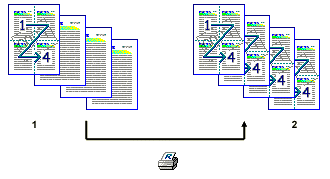
Increase Auto-keep Settings for Applications
Select the check box to apply the print settings of the previous sheet when using an application such as Microsoft® Excel®.
Applying the One Sheet Print Setting to Others
Make the print settings for the first of the four sheets of data.
These print settings are applied to the remaining three sheets.
Language:
Select the language you want to display for the printer driver.
Restore Defaults
Restores the settings on this tab to the default settings.